Interactive classroom whiteboard
Interactive-Whiteboard.Co.Uk supports schools and educational institutions in implementing interactive whiteboards designed to enrich everyday teaching practices. The value of this type of technology goes far beyond technical novelty: it lies in its ability to clarify abstract concepts, encourage pupil participation and preserve a visual record of classroom discussions. Successful deployment requires a clear understanding of how the equipment works, how it can be used in practice and which human and technical factors support its long-term adoption in the classroom.
Interactive whiteboard for the classroom: principles and everyday use
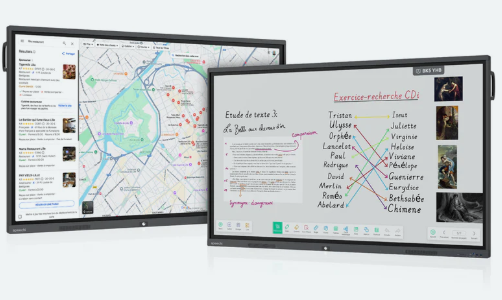
An interactive whiteboard provides a digital surface on which teachers can display and directly manipulate a wide variety of educational resources. Rather than being limited to marks made with an erasable pen, it can display multimedia presentations, video sequences, vector maps, scientific models and interactive exercises. The touchscreen responds instantly to a finger or compatible stylus, allowing teachers and pupils to navigate content naturally without cumbersome technical controls.
Everyday use is straightforward. Teachers can touch the surface to launch an application, move a geometric element, annotate a historical source or temporarily hide an answer. Multi-touch functionality can also allow several pupils to interact with the board at the same time, encouraging collaborative activities, group problem-solving and live discussion of different hypotheses.
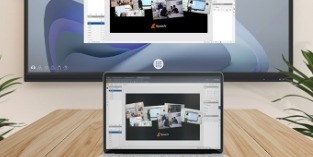
Connected to a computer and the school network, an interactive whiteboard for the classroom can form part of a broader digital ecosystem that includes audio equipment and content-sharing tools. This infrastructure makes it easier to send documents to pupils’ devices and collect their work in real time. In mathematics, manipulating geometric shapes can make demonstrations more concrete, while in language lessons, combining audio recordings with highlighted text can support pronunciation, listening comprehension and phonetic awareness.
Interactivity never replaces the teacher’s explanations; instead, it provides a dynamic visual resource for presenting, illustrating and exploring complex concepts.

What are the educational benefits of an interactive whiteboard?
Rich visual content can make complex knowledge easier to understand. By complementing verbal explanations with interactive diagrams, images and step-by-step demonstrations, teachers can make theoretical concepts more accessible. A discovery-based approach emerges naturally when pupils observe, formulate hypotheses and immediately test their reasoning on the interactive display.
This approach can also increase pupil engagement. When learners are invited to arrange a timeline, annotate a literary text, classify information or complete a scientific formula, they become active participants in the lesson. Teachers can quickly assess the group’s level of understanding and adapt the pace or content of the session without waiting for a formal written assessment.
Simultaneous access to text, images, audio and video can support different ways of learning when these resources are used in a structured and purposeful way. To avoid passive screen use, teachers can alternate collective activities on the interactive whiteboard with handwriting exercises, practical workshops, individual research and small-group discussions.
Interactive whiteboards can also support differentiated and inclusive teaching. Teachers may adjust contrast, enlarge text or images, isolate a particular instruction or repeat a multimedia resource according to pupils’ needs. Saving classroom annotations also makes it possible to retain a clear record of the lesson and provide useful material for revision or for pupils who were absent.
An interactive whiteboard can therefore help teachers illustrate complex concepts using multimedia resources, encourage direct pupil participation, centralise collective annotations, save lesson content, adapt activities to different learning needs and facilitate collaborative work within the classroom.
How does Interactive-Whiteboard.Co.Uk support the integration of an interactive whiteboard?
interactive-whiteboard.co.uk begins by assessing the physical characteristics of the classroom before recommending suitable equipment. Viewing distance, visibility from the back and sides of the room, natural light and the overall layout all help determine the appropriate screen size and the importance of anti-glare technology. Correct positioning ensures that displayed content remains clearly readable for all pupils while helping to maintain visual comfort.
Safety and ergonomics must also be carefully considered. The mounting height should be suitable for teachers as well as younger pupils, while cables need to be organised and protected to avoid creating obstacles around the teaching area. Careful installation helps maintain safe and unrestricted movement around the interactive display.
Software integration is another essential stage. interactive-whiteboard.co.uk helps ensure that the interactive whiteboard works effectively with existing computers, digital learning environments and compatible audio or video peripherals. The objective is to create a coherent ecosystem in which teachers can access their usual resources without unnecessary technical barriers.
Interactive-Whiteboard.co.uk’s support can also include practical guidance focused on real teaching situations rather than simply on technical operation. Teachers can learn how to structure an interactive lesson, create suitable activities and use annotation tools effectively within their subject area. This progressive development of skills encourages regular, confident and meaningful use of the technology.
Ongoing technical support also contributes to the long-term reliability of the investment. Preventive maintenance, software updates and specialist assistance can reduce the risk of disruption during lessons. Simple procedures for working offline or continuing a lesson during a temporary network issue can further strengthen teachers’ confidence in their classroom technology.
what criteria should schools consider before choosing an interactive whiteboard?
A complete budget assessment should take into account both direct and indirect costs, including the interactive display, wall mounting or mobile stand, installation, cabling, software licences, accessories and ongoing technical support. Identifying the main teaching use cases in advance helps schools select genuinely useful features while avoiding unnecessary expenditure on overly complex equipment.
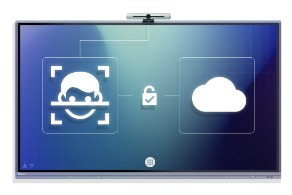
Durability and touchscreen responsiveness are particularly important in an educational environment. The interactive surface should withstand regular classroom use, provide accurate and responsive touch recognition and be easy to clean. Schools should also consider data protection requirements and ensure that any connected software or services are suitable for use in an educational setting.
A sustainable digital learning project depends on the right balance between reliable equipment, appropriate teacher training and effective long-term support. By combining these elements within a clear deployment strategy, schools can provide teaching teams with a modern, intuitive and efficient interactive environment designed for everyday classroom use.
Discover other articles : Interactive whiteboard for classroom and Interactive whiteboard for home.